Webhooks
Webhooks allow you to receive real-time notifications when events occur in your Broadcast account, such as when emails are sent, opened, when subscribers are added or removed, or when broadcast campaigns complete or fail.
What are Webhooks?
Webhooks are HTTP callbacks that Broadcast sends to your application when specific events occur. Instead of repeatedly checking for updates, your application can receive instant notifications when something happens.
Common use cases for webhooks include:
- Syncing subscriber data with your CRM
- Updating analytics dashboards in real-time
- Triggering automated workflows based on email interactions
- Logging email events for compliance purposes
- Monitoring broadcast campaign completion and success rates
- Alerting your team when broadcasts fail or encounter issues
- Integrating broadcast status updates with project management tools
- Tracking subscriber re-engagement metrics and lifecycle events
Available Event Types
Broadcast supports the following webhook event types:
Email Events
email.sent- Email was successfully sentemail.delivered- Email was delivered to the recipient's inboxemail.delivery_delayed- Email delivery was delayedemail.bounced- Email bounced (hard or soft bounce)email.complained- Recipient marked email as spamemail.opened- Recipient opened the emailemail.clicked- Recipient clicked a link in the emailemail.failed- Email failed to send
Subscriber Events
subscriber.created- New subscriber was addedsubscriber.updated- Subscriber information was updatedsubscriber.deleted- Subscriber was deletedsubscriber.subscribed- Subscriber opted in or was reactivatedsubscriber.unsubscribed- Subscriber opted outsubscriber.bounced- Subscriber email bouncedsubscriber.complained- Subscriber marked email as spam
Broadcast Events
broadcast.scheduled- Broadcast was scheduled for future sendbroadcast.queueing- Broadcast is being queued for sendingbroadcast.sending- Broadcast is currently sending to recipientsbroadcast.sent- Broadcast completed successfullybroadcast.failed- Broadcast failed completelybroadcast.partial_failure- Broadcast partially failed (some recipients failed)broadcast.aborted- Broadcast was manually abortedbroadcast.paused- Broadcast was paused
Sequence Events
sequence.subscriber_added- Subscriber was enrolled in a sequencesequence.subscriber_completed- Subscriber finished all sequence stepssequence.subscriber_moved- Subscriber was moved to another sequencesequence.subscriber_removed- Subscriber was removed from sequence (deactivated, redacted, manually stopped, or deleted)sequence.subscriber_paused- Subscriber's sequence was pausedsequence.subscriber_resumed- Subscriber's paused sequence was resumedsequence.subscriber_error- Sequence encountered an error for this subscriber
System Events
message.attempt.exhausted- All delivery attempts failedtest.webhook- Test webhook event
Setting Up Webhooks
To set up a webhook endpoint:
- Go to Webhook Endpoints in your Broadcast dashboard sidebar
- Click Add Webhook Endpoint
- Enter your webhook URL (must be HTTPS)
- Select the event types you want to receive
- Configure retry attempts (0-20, default: 6)
- Optionally add a description
- Click Create Webhook Endpoint
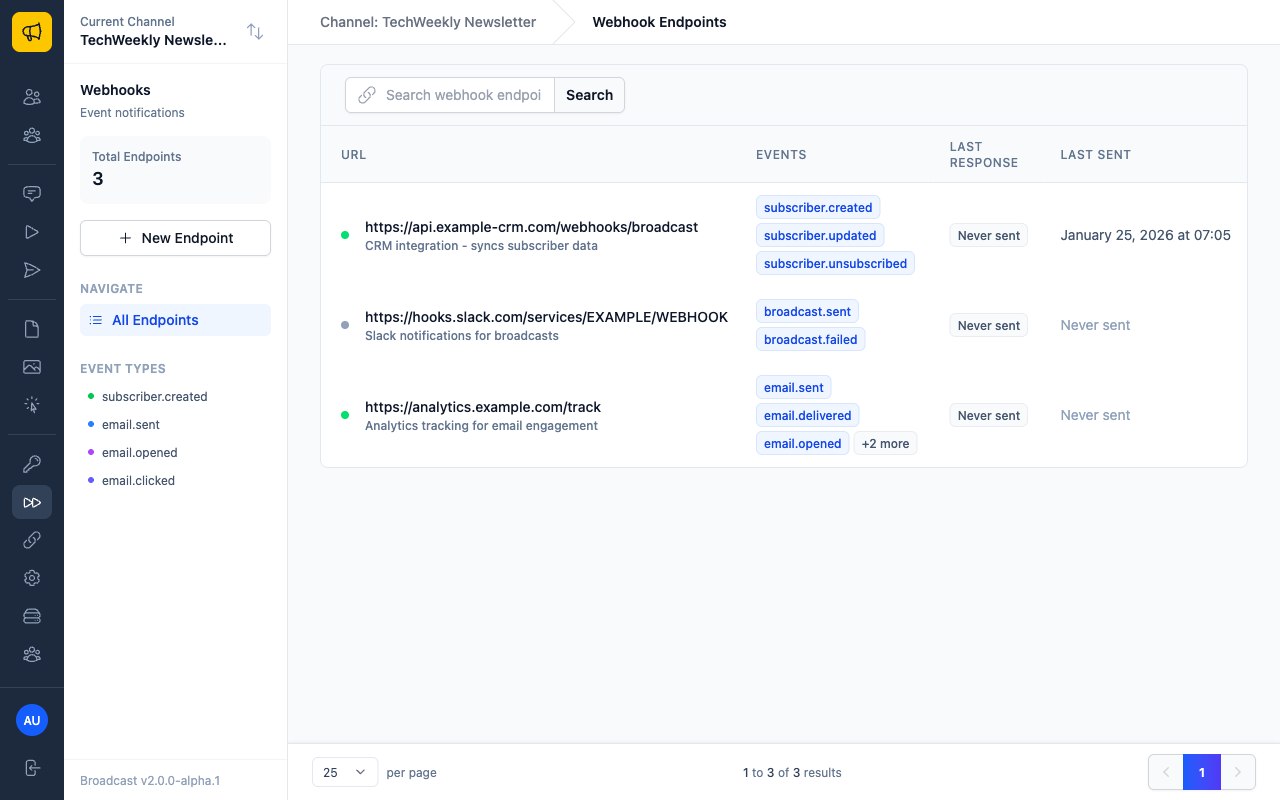
Creating a New Webhook Endpoint
Click the New endpoint button to access the webhook creation form:
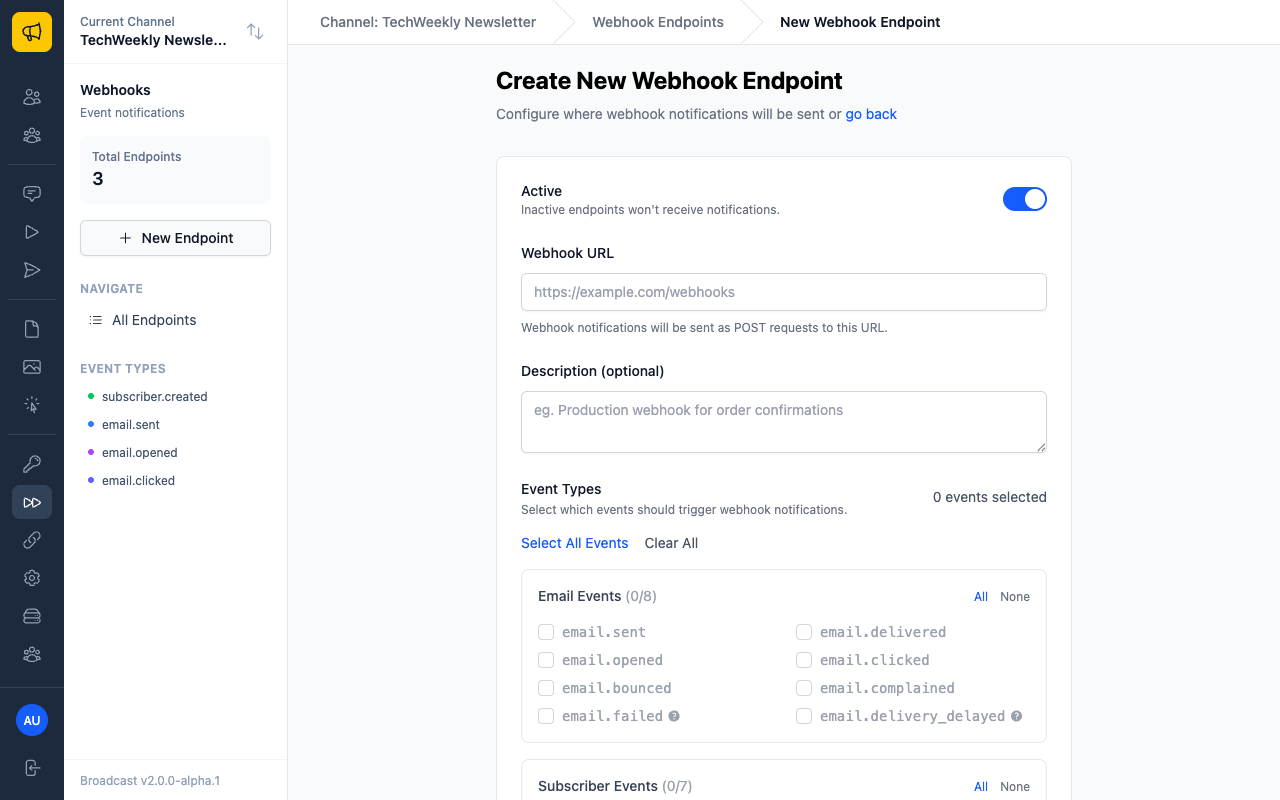
Configuration Options
Retries to Attempt (0-20, default: 6) - Controls how many times Broadcast will retry failed webhook deliveries - Set to 0 to disable retries entirely - Higher values increase reliability but may delay failure notifications - Each endpoint can have its own retry configuration
HTTPS Required
Webhook URLs must use HTTPS for security. HTTP URLs will be rejected.
Webhook Payload Structure
All webhook payloads follow this structure:
{
  "id": 123,
  "type": "email.sent",
  "created_at": "2024-01-15T10:30:00Z",
  "data": {
    // Event-specific data
  }
}
Email Event Payload Example
{
  "id": 123,
  "type": "email.opened",
  "created_at": "2024-01-15T10:30:00Z",
  "data": {
    "receipt_id": 456,
    "email": "[email protected]",
    "identifier": "unique-email-id",
    "opened_at": "2024-01-15T10:30:00Z",
    "delivered": true,
    "opened": true,
    "clicked": false,
    "bounced": false,
    "complaint": false,
    "unsubscribed": false
  }
}
Subscriber Event Payload Example
Subscriber Created Event:
json
{
  "id": 789,
  "type": "subscriber.created",
  "created_at": "2024-01-15T10:30:00Z",
  "data": {
    "subscriber_id": 101,
    "email": "[email protected]",
    "first_name": "John",
    "last_name": "Doe",
    "subscribed_at": "2024-01-15T10:30:00Z",
    "unsubscribed_at": null,
    "is_active": true,
    "custom_data": {
      "company": "Example Corp"
    },
    "source": "api"
  }
}
Broadcast Event Payload Example
{
  "id": 456,
  "type": "broadcast.sent",
  "created_at": "2024-01-15T10:30:00Z",
  "data": {
    "broadcast_id": 123,
    "name": "Weekly Newsletter",
    "subject": "Your Weekly Update - January 2024",
    "status": "sent",
    "total_recipients": 1500,
    "broadcast_recipients_count": 1500,
    "percentage_complete": 100.0,
    "sent_at": "2024-01-15T10:30:00Z",
    "scheduled_send_at": "2024-01-15T10:00:00Z",
    "created_at": "2024-01-15T09:00:00Z",
    "updated_at": "2024-01-15T10:30:00Z",
    "broadcast_channel_id": 5,
    "segment_ids": [1, 2],
    "tags": ["newsletter", "weekly"]
  }
}
Exhausted Event Payload Example
When all delivery attempts fail, a message.attempt.exhausted event is sent with complete failure details:
{
  "id": 789,
  "type": "message.attempt.exhausted",
  "created_at": "2025-01-15T16:30:00Z",
  "data": {
    "original_event_id": 123,
    "original_event_type": "email.sent",
    "webhook_endpoint_id": 45,
    "total_attempts": 6,
    "first_attempt_at": "2025-01-15T10:30:00Z",
    "last_attempt_at": "2025-01-15T16:30:00Z",
    "final_error": "Connection timeout after 30 seconds",
    "final_response_status": 500,
    "original_event_data": {
      // Complete original event payload for recovery
    }
  }
}
Event Context Examples
Important: The same event type can have different payload structures depending on the email source (broadcast, sequence, or transactional).
Sequence Email Events
When emails are sent from automated sequences, the payload includes sequence context:
Sequence Email Sent:
json
{
  "id": 123,
  "type": "email.sent",
  "created_at": "2025-01-15T10:30:00Z",
  "data": {
    "sequence_id": 45,
    "sequence_name": "Welcome Series",
    "sequence_step_id": 67,
    "sequence_step_label": "Welcome Email 1",
    "sequence_step_action": "send_email",
    "subscriber_id": 89,
    "subscriber_email": "[email protected]",
    "subscriber_sequence_id": 12,
    "broadcast_channel_id": 1,
    "sent_at": "2025-01-15T10:30:00Z"
  }
}
Sequence Email Opened:
json
{
  "id": 124,
  "type": "email.opened",
  "created_at": "2025-01-15T11:15:00Z",
  "data": {
    "receipt_id": 789,
    "sequence_id": 45,
    "sequence_step_id": 67,
    "subscriber_id": 89,
    "subscriber_email": "[email protected]",
    "opened_at": "2025-01-15T11:15:00Z"
  }
}
Transactional Email Events
Transactional emails include different context fields:
Transactional Email Sent:
json
{
  "id": 456,
  "type": "email.sent",
  "created_at": "2025-01-15T10:30:00Z",
  "data": {
    "transactional_id": 78,
    "recipient_email": "[email protected]",
    "recipient_name": "John Doe",
    "subject": "Order Confirmation",
    "broadcast_channel_id": 1,
    "subscriber_id": 123,
    "status": "sent",
    "sent_at": "2025-01-15T10:30:00Z"
  }
}
Transactional Email Opened:
json
{
  "id": 457,
  "type": "email.opened",
  "created_at": "2025-01-15T11:00:00Z",
  "data": {
    "receipt_id": 101,
    "transactional_id": 78,
    "recipient_email": "[email protected]",
    "opened_at": "2025-01-15T11:00:00Z"
  }
}
Context-Aware Handler Example
Here's how to handle different email contexts in a single webhook handler:
function handleEmailOpened(event) {
  const data = event.data;

  // Determine email context by checking for specific fields
  if (data.sequence_id) {
    // Handle sequence email opened
    analytics.track('sequence_email_opened', {
      sequence_id: data.sequence_id,
      sequence_step_id: data.sequence_step_id,
      subscriber_id: data.subscriber_id,
      email: data.subscriber_email
    });

    // Update sequence engagement metrics
    updateSequenceEngagement(data.sequence_id, data.subscriber_id);

  } else if (data.transactional_id) {
    // Handle transactional email opened
    analytics.track('transactional_email_opened', {
      transactional_id: data.transactional_id,
      recipient_email: data.recipient_email
    });

    // Update order/transaction status
    updateTransactionEngagement(data.transactional_id);

  } else if (data.identifier && data.email) {
    // Handle broadcast email opened
    analytics.track('broadcast_email_opened', {
      receipt_id: data.receipt_id,
      email: data.email,
      identifier: data.identifier
    });

    // Update broadcast analytics
    updateBroadcastEngagement(data.receipt_id);

  } else {
    console.warn('Unknown email.opened context', data);
  }
}
Webhook Security
Broadcast signs all webhook payloads using HMAC-SHA256 to ensure authenticity. You should verify the signature before processing webhook events.
Signature Verification
Each webhook request includes these headers:
Content-Type: application/json- Request content typeUser-Agent: Broadcast-Webhooks/1.0- User agent identifierbroadcast-webhook-id- Unique identifier for the webhook eventbroadcast-webhook-timestamp- Unix timestamp when the webhook was sentbroadcast-webhook-signature- HMAC signature for verification
The signature is calculated using:
HMAC-SHA256(timestamp + "." + payload, webhook_secret)
Example Verification (Node.js)
const crypto = require('crypto');

function verifyWebhook(payload, headers, secret) {
  const signature = headers['broadcast-webhook-signature'];
  const timestamp = headers['broadcast-webhook-timestamp'];

  // Check timestamp to prevent replay attacks (within 5 minutes)
  const now = Math.floor(Date.now() / 1000);
  if (Math.abs(now - timestamp) > 300) {
    return false;
  }

  // Calculate expected signature
  const signedPayload = `${timestamp}.${payload}`;
  const expectedSignature = crypto
    .createHmac('sha256', secret)
    .update(signedPayload)
    .digest('base64');

  // Extract signature from header (format: "v1,signature")
  const actualSignature = signature.split(',')[1];

  // Compare signatures
  return crypto.timingSafeEqual(
    Buffer.from(expectedSignature),
    Buffer.from(actualSignature)
  );
}
Delivery and Retries
Broadcast implements a robust retry mechanism for webhook deliveries:
- Retry Schedule: 5 seconds, 5 minutes, 30 minutes, 2 hours, 5 hours, 10 hours
- Success Criteria: HTTP status codes 200-299
- Timeout: 30 seconds per request
- Retries per Endpoint: Configurable (0-20 attempts, default: 6)
- Exhausted Events: After all retries fail, a
message.attempt.exhaustedevent is sent
Monitoring Webhook Deliveries
You can monitor webhook delivery status in the dashboard:
- Go to Webhook Endpoints
- Click on your webhook endpoint
- View delivery logs, success rates, and error messages
- Check recent deliveries and their response codes
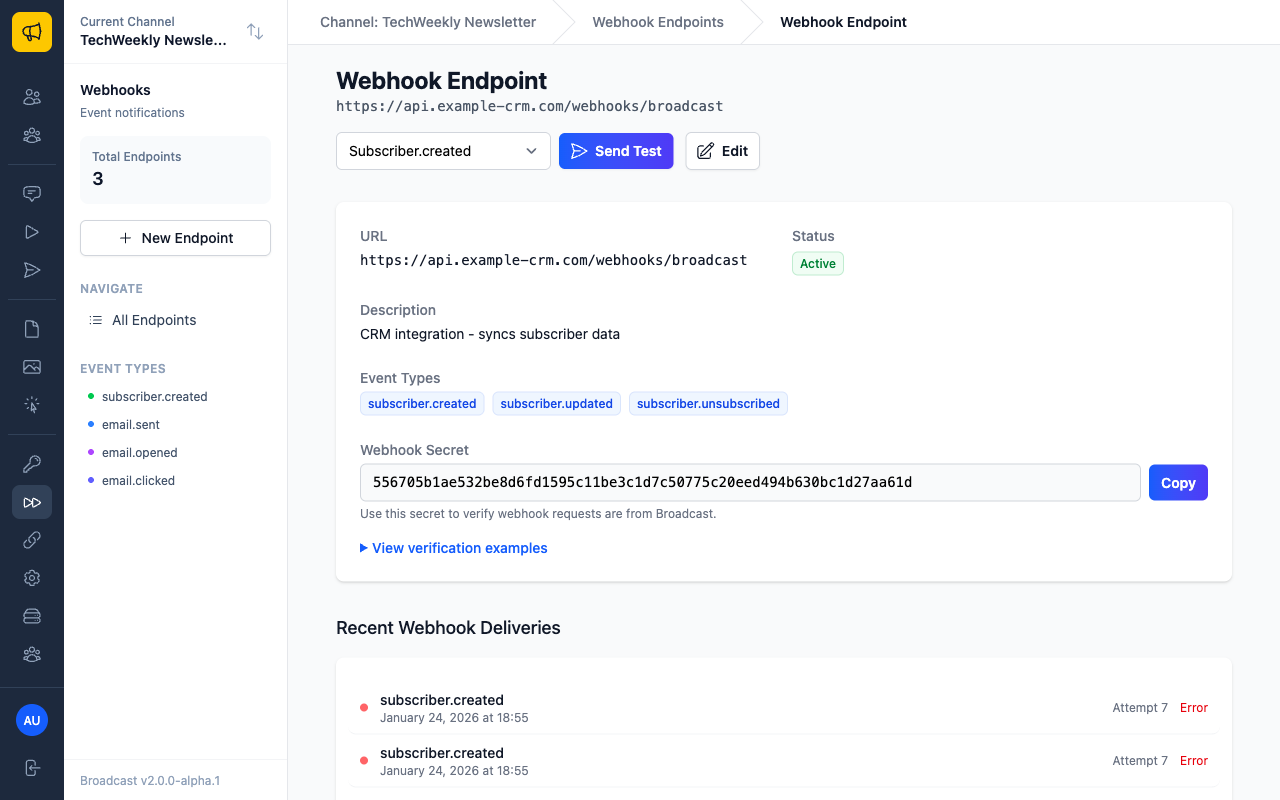
Viewing Delivery Details
Click on any delivery in the Recent Webhook Deliveries section to see comprehensive details including the event payload, HTTP response, and retry information:

Testing Webhooks
Broadcast provides several ways to test your webhook endpoints:
Test Webhook Button
Click the Test Webhook button on any webhook endpoint to send a test event immediately.
Using webhook.site
For development, you can use webhook.site to inspect webhook payloads:
- Go to webhook.site and copy the unique URL
- Create a webhook endpoint with this URL
- Trigger events in Broadcast to see the payloads
Local Development with ngrok
For local testing, use ngrok to create a secure tunnel:
# Start your local server
node server.js

# In another terminal, create a tunnel
ngrok http 3000

# Use the HTTPS URL from ngrok in your webhook endpoint
Best Practices
Handling Webhook Events
- Respond Quickly: Return a 200 status code within 30 seconds
- Process Asynchronously: Queue webhook events for background processing
- Handle Duplicates: Events may be sent multiple times; implement idempotency
- Validate Signatures: Always verify webhook signatures for security
- Log Events: Keep logs of webhook events for troubleshooting
Example Handler (Express.js)
app.post('/webhooks/broadcast', express.raw({type: 'application/json'}), (req, res) => {
  const signature = req.headers['broadcast-webhook-signature'];
  const timestamp = req.headers['broadcast-webhook-timestamp'];
  const payload = req.body;

  // Verify signature first
  if (!verifyWebhook(payload, req.headers, process.env.WEBHOOK_SECRET)) {
    return res.status(401).send('Invalid signature');
  }

  // Parse the payload
  const event = JSON.parse(payload);

  // Handle different event types
  switch (event.type) {
    case 'email.opened':
      handleEmailOpened(event.data);
      break;
    case 'subscriber.created':
      handleNewSubscriber(event.data);
      break;
    case 'broadcast.sent':
      handleBroadcastSent(event.data);
      break;
    case 'broadcast.failed':
      handleBroadcastFailed(event.data);
      break;
    default:
      console.log('Unknown event type:', event.type);
  }

  // Queue for background processing
  queue.add('process-webhook', event);

  // Respond immediately
  res.status(200).send('OK');
});


// Example broadcast event handlers
function handleBroadcastSent(data) {
  console.log(`Broadcast "${data.name}" sent successfully to ${data.total_recipients} recipients`);

  // Update your analytics dashboard
  analytics.track('broadcast_completed', {
    broadcast_id: data.broadcast_id,
    subject: data.subject,
    recipient_count: data.total_recipients,
    completion_rate: data.percentage_complete
  });

  // Sync with your CRM
  crm.updateCampaignStatus(data.broadcast_id, 'completed');
}

function handleBroadcastFailed(data) {
  console.log(`Broadcast "${data.name}" failed`);

  // Alert your team
  slack.notify(`🚨 Broadcast failed: ${data.name} (ID: ${data.broadcast_id})`);

  // Log for investigation
  logger.error('Broadcast failed', { broadcast_id: data.broadcast_id, status: data.status });
}
Error Handling
If your webhook endpoint returns an error status code (4xx or 5xx), Broadcast will retry the delivery according to the retry schedule. To prevent retries for permanent failures, return a 200 status code but handle the error in your application logic.
Troubleshooting
Common Issues
Webhook not receiving events - Check that your endpoint URL is correct and accessible - Verify the endpoint is configured for the correct event types - Check firewall settings and SSL certificate validity
Signature verification failing - Ensure you're using the correct webhook secret - Check that you're calculating the signature correctly - Verify the timestamp is within the 5-minute window
High failure rates - Check your endpoint's response time (must be under 30 seconds) - Verify your server can handle the webhook volume - Review error logs for specific failure reasons
Payload structure issues
- Events from different sources (broadcast, sequence, transactional) have different payload structures
- Check for context-specific fields like sequence_id, transactional_id, or identifier
- Use the context-aware handler pattern to handle different payload structures
- Log unexpected payload structures for investigation
Performance Considerations
High-Volume Webhook Processing - Process webhooks asynchronously using background queues - Implement connection pooling for database operations - Use batch processing for multiple webhook events - Cache frequently accessed data (subscriber info, configuration) - Monitor endpoint response times and optimize accordingly
Recommended Architecture ```javascript // Receive webhook quickly, queue for processing app.post('/webhooks/broadcast', (req, res) => { // Verify signature if (!verifySignature(req)) { return res.status(401).send('Invalid signature'); }
// Queue immediately, respond fast queue.add('webhook-processor', { payload: req.body, timestamp: Date.now() });
res.status(200).send('OK'); });
// Process in background worker queue.process('webhook-processor', async (job) => { const event = job.data.payload; await processWebhookEvent(event); }); ```
Getting Help
If you're experiencing issues with webhooks:
- Check the delivery logs in your webhook endpoint dashboard
- Review the error messages and response codes
- Test your endpoint with the built-in test webhook feature
- Contact support at [email protected] with your webhook endpoint details